WDW Food&Wine
- 4.6
- Rating
- 50.00K
- Installs
- Free
- Price

 Analysis by App-foxy
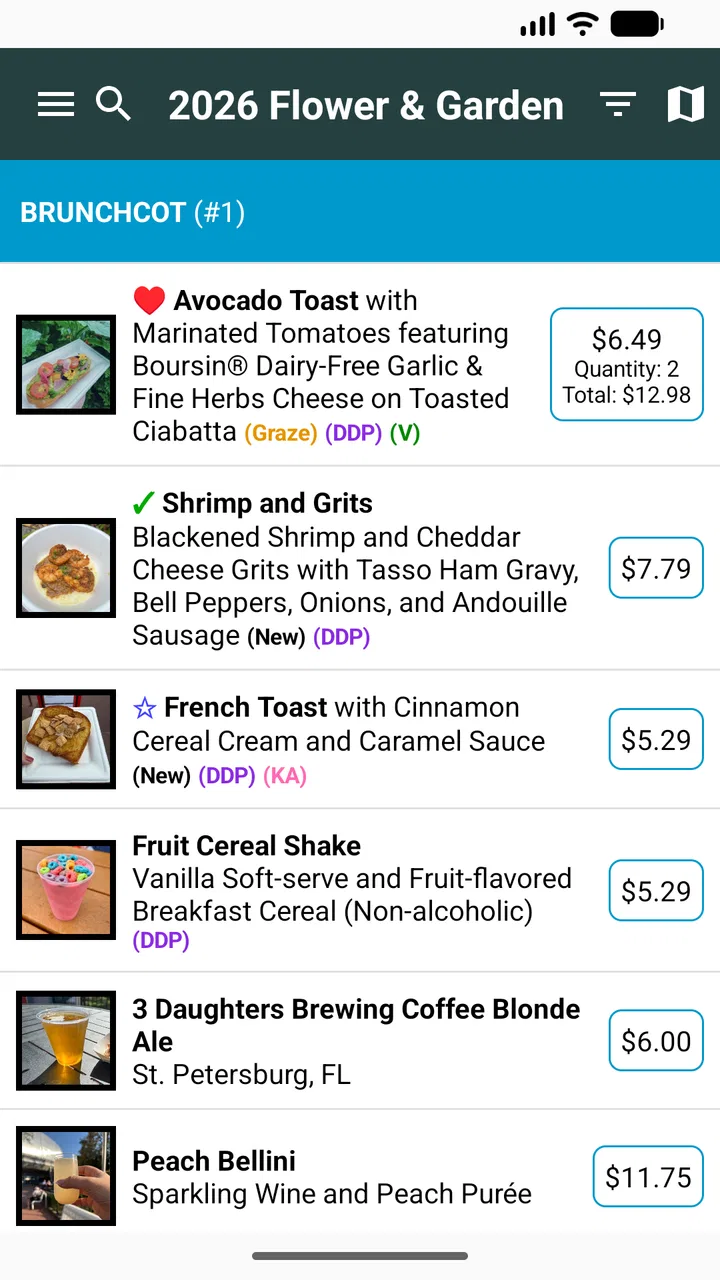
I found WDW Food&Wine most useful as a lightweight companion for a food-focused day at Epcot. It is built around the idea of a festival passport, so its value is not in replacing a general map, restaurant app, or trip planner. Instead, it gives the food-and-drink side of a visit its own place, helping me keep track of what I wanted to try and what I had already experienced. That narrow purpose is also what makes it easy to understand.
Developed by Small World Code, LLC, this free Food & Drink app has an Everyone content rating and runs on devices using iOS 11 or later. It has been available since March 3, 2018, and version 1.1.7 is the current release. The app has reached over 50,000 installs, with an average rating of 4.6 from more than a hundred ratings and dozens of written reviews. Those figures suggest that it has found a small but interested audience rather than trying to be an all-purpose travel tool.
How the passport approach affects readability and navigation
The first thing I noticed is that the passport concept gives the app a clear mental model. I do not have to wonder whether I am looking at a full resort guide, a booking service, or a social feed. I open it with a simple question in mind: which festival items do I want to explore, and which ones have I already marked? That focus makes the experience less intimidating than a large destination app packed with unrelated information.
You May Also Like

 AccuWeather: Weather Radar
AccuWeather Review: A Quick, Clear Forecast for Everyday Decisions
For everyday plans, the best forecast is the one you can understand quickly. AccuWeather makes rain timing, radar, and local conditions easy to act on, with a few trade-offs.

 Hill Climb Racing
Why Hill Climb Racing Still Turns Crashes Into One More Run
A tiny car, a bumpy hill and one more upgrade: Hill Climb Racing keeps resurfacing because its simple chaos makes every near-miss feel personal.

 AliExpress - Shopping App
AliExpress Makes Global Shopping Feel Personal, but Shoppers Bear the Risk
AliExpress turns a global marketplace into a pocket-sized discovery engine. Its reach is useful, its shopping loop compelling, and its trade-offs easy to miss.

 Lords Mobile: Kingdom Wars
Lords Mobile Is a Kingdom-Building Routine, Not a Quick Match
A case-by-case verdict on the building, battles, device demands, and social commitments that make Lords Mobile rewarding for some players and exhausting for others.

 PDF Scanner app - TapScanner
TapScanner Makes Paperwork Easier to Capture, Check, and Share
TapScanner makes scanning with a phone feel less like a rescue operation and more like a dependable step in getting work done. Its capture tools are useful, though not flawless.

 Block Blast!
 Shows How Much a Puzzle Game Can Leave Out
A quiet grid game shows why puzzle players increasingly value instant clarity, repeatable skill and low-pressure play—and where the genre still needs to catch up.
More From Our News Desk
View All News


For a user who prefers straightforward screens, this kind of focused layout can be more comfortable than navigating several layers of maps, reservations, menus, and promotional content. The app’s identity is immediately tied to the Epcot Food Festival Passport, so I can approach it as a checklist and reference tool instead of learning a complicated planning system. I especially appreciate that distinction when I am already inside the park and do not want to spend time interpreting a crowded interface.
There is a practical difference between reading information at home and reading it while walking. Before a visit, I can use the passport idea to make a short wish list. During the day, I can return to that list rather than repeatedly searching through a general web page. This is one of the app’s strongest use cases: turning a broad festival experience into a personal sequence of stops.
That said, a passport is not automatically the same thing as a complete navigation system. I would not treat it as my only source for finding a location, checking current operating details, or organizing every part of a park visit. A dedicated map or official destination resource is still the better companion when the main problem is orientation. WDW Food&Wine makes more sense beside those tools, not necessarily instead of them.
My advice is to prepare before entering the park. Use the app when you are calm, decide which entries matter most to you, and then keep the list short enough to remain useful. Trying to turn every available food option into a rigid schedule could make the day feel like an obligation. The passport works better as a flexible record of choices than as a promise that every stop must be completed.
Why the focused design helps some readers
People who find broad travel apps overwhelming may benefit from the limited subject matter here. The app is not asking me to manage hotel details, transportation, attractions, or a complete itinerary at the same time. That reduction in scope can make the main task easier to follow, particularly for someone visiting with family members who need frequent breaks or who do not want a complicated plan.
It can also help groups communicate. One person can use the passport to remember food ideas while another handles directions or reservations. That separation is useful because it avoids forcing one person to manage every detail from one screen. In my experience, shared trips become less stressful when each tool has a defined job.
Still, users who need large text, strong contrast, spoken guidance, or highly adjustable display controls should evaluate the app directly on their own device before depending on it. I would not assume that a simple concept guarantees every accessibility preference. The best approach is to check whether the current presentation is comfortable for your eyesight and reading needs during a short trial at home.
Motor, sensory, and situational considerations
A food festival is a demanding environment for any app. I may be standing in a queue, holding a drink, carrying a bag, dealing with heat or noise, and trying to keep up with other people. That changes what “easy to use” means. A screen that feels perfectly manageable on a sofa can become frustrating when I have only one hand available and limited attention.
The passport format has an advantage here because it encourages brief interactions. I can look up a planned stop, make a quick decision, and put the phone away. That is more practical than composing long notes or repeatedly entering detailed searches. For visitors with limited dexterity, reducing the number of interactions matters as much as reducing the amount of reading.
My most useful workflow is to do the information-heavy work before the visit. I would review the passport at home, identify a few priorities, and use the park visit for quick confirmation and tracking. This reduces the need for precise tapping while moving through a crowd. It also gives anyone with motor fatigue a chance to participate in planning without having to operate the phone continuously in a busy setting.
For sensory-sensitive visitors, the app can support a calmer approach by helping create a predictable food plan. Instead of making every decision at the point of sale, I can choose a few possibilities in advance and leave room to change course. That does not remove the noise, waiting, smells, or crowding of the festival, but it may reduce the mental load of deciding what to do next.
I would be careful with the word “passport,” though. The app is best understood as a personal festival aid, not as a guarantee that every item will suit a particular diet, allergy, texture preference, or sensory need. Anyone with strict dietary requirements should verify ingredients and preparation details through the appropriate current source before ordering. The app can help me remember what I want to investigate; it should not be my only safety check.
There is also a useful trade-off between independence and shared assistance. A visitor who can comfortably use a phone may manage the passport alone, while someone with visual, motor, or cognitive limitations may prefer a companion to handle the device after discussing the choices together. That does not make the app unusable. It simply means the most inclusive workflow may be collaborative rather than individual.
Using it with different abilities and travel styles
For a person with limited stamina, I would use the passport to group food interests by broad areas or by the natural order of the day, while keeping the plan deliberately loose. This avoids unnecessary backtracking without pretending that a festival visit can be perfectly optimized. If a stop is crowded or the user needs a break, the list can remain a reminder rather than a demand.
For a user who processes information more comfortably in small portions, I would avoid opening the app with an enormous set of possibilities. Start with a handful of meaningful choices, decide what counts as a successful visit, and add more only if the day feels manageable. The app’s focused purpose supports that approach, but the user still controls whether the passport becomes a helpful shortlist or an exhausting catalog.
For families, I see an opportunity to give children or relatives a role in the day. They can help choose the next item or mark what the group has tried, while an adult handles the practical details. This turns the passport into a conversation tool rather than a private checklist. It is a small distinction, but it can make the experience more inclusive for people who do not want to navigate a full travel app.
For visitors who dislike using phones in public, the app is more valuable during preparation than during the festival itself. I would make notes about the choices I care about before leaving, then use the application only when necessary. That approach also helps preserve battery and attention, both of which are easy to spend quickly during a long day.
Where the app fits, and where it creates friction
The clearest limitation is its narrow role. If I want live trip management, broad attraction planning, detailed transportation help, or a single place for every reservation and schedule, I would choose a more comprehensive official or general travel solution. WDW Food&Wine is appealing precisely because it does not try to be all of those things, but that also means I need another tool for the rest of the visit.
I would also avoid assuming that a festival passport answers every practical question about food. A checklist can tell me what I intended to explore, but it does not replace current confirmation when availability, ingredients, preparation, or personal health concerns matter. That distinction is particularly important for users who cannot make casual substitutions or who need reliable information before approaching a stand.
Another friction point is the difference between a planned experience and a real one. Festivals change as the day unfolds: a line may be too long, a companion may become tired, or a preferred option may no longer fit the group’s needs. If I treat the passport as a completion challenge, its tracking function could add pressure. I get more value when I treat it as a memory aid and allow unfinished entries to remain unfinished.
Some readers may also prefer a more familiar alternative: a paper list, a notes application, or a general map. Those options can be faster for users who already have a simple system and do not need a dedicated festival interface. The app earns its place when the passport format makes the choices easier to organize or more enjoyable to follow. If I only need three reminders, a basic note may be enough.
On the other hand, a generic notes app lacks the specific context that makes this product worthwhile. I do not have to build the structure from scratch, and I can approach the visit through the festival’s food theme rather than inventing my own categories. That is the central trade-off: general tools offer flexibility, while this app offers a more focused starting point.
A realistic day with the app
Imagine that I am visiting Epcot with two relatives, one of whom tires easily and another who wants to try several festival foods. Before leaving, I open the passport and narrow our interests to a manageable set. We agree that the goal is to enjoy a few memorable stops, not to complete everything. During the visit, I check the next preferred option while we are already taking a break, then put the phone away before we move.
When the group changes its mind, I do not need to rebuild the entire day. I can skip an entry, keep a later possibility in mind, and let the passport record what actually happened. That flexibility is more valuable than a supposedly perfect route. It also gives the relative with limited stamina a real voice in the plan, because the group can choose based on comfort rather than chasing a fixed sequence.
In that situation, I would pair the app with a map and with direct confirmation for any dietary or health-related concern. The passport handles the food-focused memory work; the other resources handle orientation and safety. This division makes the overall setup more dependable than expecting one small app to solve every problem.
My inclusive verdict after using the festival passport
I see WDW Food&Wine as a friendly, specialized companion for visitors who want to organize an Epcot food experience without carrying a full travel planner in their hands. Its strongest quality is clarity of purpose. The passport idea gives me a simple way to prepare, choose, and remember, and that can make a busy festival feel more approachable for people with different energy levels and planning styles.
It is especially suitable for someone who enjoys food-focused visits, prefers a short list over a large itinerary, or wants to share decisions with family and friends. The free price removes a major barrier to trying it, and the Everyone rating makes it appropriate as a general family-oriented app. The established release history and current version also show that it is not a brand-new experiment, while the rating indicates that many users have found the concept worthwhile.
I would not recommend relying on it alone if you need comprehensive navigation, detailed trip management, or dependable answers for strict dietary requirements. Users who need particular text, contrast, input, or sensory accommodations should test the current interface personally and decide whether a companion-assisted workflow or a different tool is more comfortable. Those are not reasons to dismiss it; they are reasons to use it realistically.
The best way to use WDW Food&Wine is as a flexible food passport, not as the command center for an entire park day. Prepare a small list, leave room for fatigue and changing plans, confirm important dietary details elsewhere, and let the app reduce decision-making rather than create another task. With that mindset, I think it offers a genuinely useful, focused experience for the right visitor.
FAQs for WDW Food&Wine
01What is WDW Food&Wine?
WDW Food&Wine is a useful companion for visitors planning a food-focused trip to Walt Disney World, especially during the EPCOT International Food & Wine Festival. It helps users explore participating booths, dishes, drinks, menus, and festival information in one place. The app is most valuable for comparing options before walking around the park and deciding where to spend time and money.
02Does WDW Food&Wine include menus and food prices?
The app is designed to provide practical details about festival offerings, including booth locations, available dishes, beverages, and, where published, prices. However, Disney can change menus, portions, ingredients, and costs during the event. For that reason, visitors should treat the information as a planning guide and confirm important details in the park, particularly when looking for allergens, seasonal items, or limited-time offerings.
03Can WDW Food&Wine help users plan their festival route?
Yes, one of its main benefits is helping guests organize a tasting route before entering EPCOT. Users can review booths and offerings, identify foods they want to try, and reduce unnecessary walking between areas of the park. It does not replace Disney’s official park maps or real-time navigation, but it can make a busy festival day more structured and easier to manage.
04Is WDW Food&Wine suitable for guests with dietary restrictions?
It can be helpful for guests researching vegetarian, vegan, allergy-friendly, or otherwise restricted choices, because reviewing menus in advance makes it easier to identify potentially suitable items. Nevertheless, the app should not be considered a guarantee that a dish is safe. Recipes and preparation procedures may change, so guests with serious allergies should always speak directly with Disney food-service cast members before ordering.
05Is WDW Food&Wine free to download and does it require internet access?
Availability, pricing, and supported features can depend on the version of the app and the platform where it is downloaded. Some information may be accessible without constant connectivity after loading, but an internet connection is generally recommended for current menus, updates, and event details. Users should also remember that mobile data or Wi-Fi may be needed while moving around the park.
Pros
- Menus and event details are easy to browse in one place.
- Useful for comparing dining options before visiting the parks.
- Helps discover limited-time Food & Wine Festival offerings.
- Can support planning around dietary preferences and meal choices.
- Convenient reference for snacks
- drinks
- and festival locations.
Cons
- Coverage may be limited outside the Walt Disney World resort.
- Some prices and menus can change without immediate updates.
- Festival information is less useful when the event is not running.
- Requires internet access for the most reliable current details.
- It may not include every restaurant or unofficial dining option.

WDW Food&Wine
Gallery